


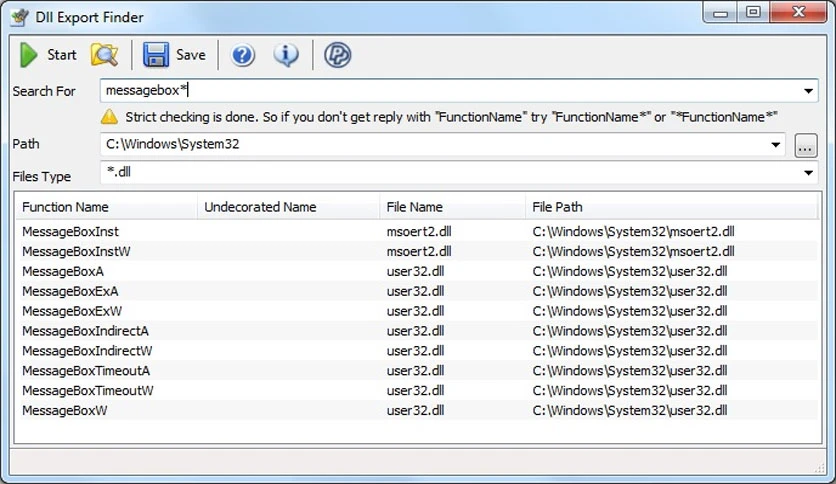
免费下载适用于 Windows PC 的 Jacquelin Potier Dll Export Finder。它是一个方便的工具,可以在指定目录中定位 DLL 导出的函数。如果您很难回忆起包含所需导出函数的特定 DLL,那么此工具可以帮助您。
它通过提供用户友好且高效的解决方案,简化了 DLL 中导出函数的识别。 Its key features make it a valuable asset for users seeking seamless navigation through DLLs without the hassle of installation or complex interfaces.
它的突出优点之一是它的便携性。用户可以将应用程序文件放置在磁盘上的任何位置,无需安装,只需单击 EXE 文件即可启动程序。 Additionally, the tool can be stored on a USB flash drive, offering the convenience of running it on various PCs without needing prior installation.此外,它无需修改 Windows 注册表设置即可运行,确保无忧体验。
该工具的界面旨在易于使用。它采用传统的窗口布局,使用户能够通过包括特定的驱动器或目录来定义扫描范围。用户还可以根据类型应用文件过滤器,并输入文件名以供扫描期间考虑。 Upon completion of the scan, the tool presents results displaying the function, undecorated information, file name, and the complete path for each DLL.
它还允许用户将此信息复制到剪贴板或以各种格式导出,例如 XML、TXT、HTML 或 CSV。虽然它没有额外的突出功能,但其主要功能仍然高效且有效。
通过测试,它表现出了卓越的稳定性。它没有出现挂起、崩溃或显示错误消息等问题。该工具对用户命令的响应时间值得称赞,可以快速执行扫描任务,同时保持最小的资源消耗。它运行顺利,在此过程中占用的 CPU 和 RAM 资源很少。虽然它可能缺乏复杂的自定义选项,但它是识别具有导出函数的 DLL 的简单解决方案。 Its simplicity ensures that it can be efficiently utilized by anyone seeking efficient DLL navigation without delving into complex configurations.
Dll Export Finder 是一个可靠且易于使用的工具,用于识别包含特定导出函数的 DLL。 Its portability, user-friendly interface, and stability make it a valuable asset for users seeking a straightforward solution without the complexities often associated with similar tools.虽然它可能缺乏高级功能,但其简单性确保了所有用户都易于使用。
| 版本 | 兼容平台 | 语言 | 大小 | 更新时间 | 下载 |
|---|---|---|---|---|---|
| 1.5.9 | 英文 | 1.0MB | 2026-09-27 | ||
| 1.5.7 | 英文 | 1.0 MB | 2024-04-30 | ||
| 1.5.6 | 英文 | 1.0 MB | 2024-03-27 | ||
| 1.5.5 | 英文 | 1.0 MB | 2024-03-05 |





评分及评论
暂无评分
来评个分数吧